[ Log In]
Need Help? Call 281-213-5643 - 9am-5pm CST for Sales and Support, or visit the FORUM
Follow us on Facebook
  • blueChick v. 4.2 CNC Machine
    Available in two sizes 1'x3' and 1'x2' routing areas.
  • Mechanics to Minimize Backlash
    Running on tensioned roller chain to eliminate backlash and small drive sprockets to increase mechanical precision.
  • Cable Carriers
    Perfectly manage the cables and hoses with these cable chains.
  • greenBull CNC Machine
    If you need BIG, we've got BIG. Available in 5 foot and 6 foot widths. Make it as long as you want!
  • Spindles and VFDs
    1.5 kW, 2.2 kW and 4.0 kW available. Also see our 1/8", 1/4" and 1/2" ER-20 Collets
  • blackTooth Laser Cutter and Engraver
    New and coming very soon, lasing all kinds of materials.

redFrog Pick and Place Machine - Priced for the Hobbyist and Totally Hackable

BuildYourCNC's very own Pick and Place Machine offered to the public. This is the pick and place machine we use in-house to assemble our electronic products. The redFrog (our name for the pick and place machine) is a machine that picks-up very small components (SMD - Surface Mount Devices) and places them on the PCB (Printed Circuit Boards).

If you're still wondering what these machines do, please have a look at the video below showing the complete assembly process starting from applying the solder paste, pick and place and finally sintering (reflowing) the board to fuse the parts to the board. This machine is constantly in development and features will be updated as further development and revisions happen.

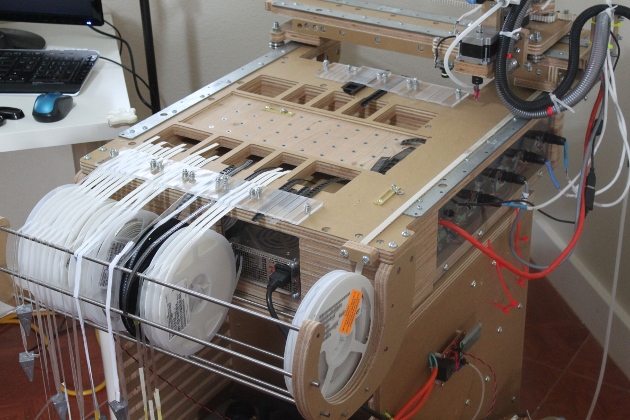
The features of the redFrog pick and place machine include the the suction responsible for the picking functionality, 3 axis motion and control, reel and tape holder, gravity pulled tape cover and internal computer. The suction for picking the components is created using a vacuum pump (3 CFM) and tank combination (vacuum shown may not be the one provided in the system). The computer being housed internally enables the user to locate the machine more conveniently (only a keyboard, mouse and monitor is plugged into the machine. The motion control is provided by stepping motors for all axes and the part rotation and is powered by drivers capable of 3.0 amps. A good base is still in development, so the current machines will need a base/table 21-1/2" x 20-1/2" (546.1mm x 520.7mm). The carcass shown in the video is not included as it really is not the most elegant solution for this system.

The vacuum pump is controlled by a circuit designed by us to keep the price down (similar circuits used in industrial applications carry a very high price due to their specialization. This circuit keeps a range of suction in the tank at all times so the picking can be at its best performance. The range of suction is controlled by two potentiometers (components that can be adjusted like a dial on a stereo) to maintain a high and low vacuum and only run the vacuum when the tank needs to be . This vacuum is shown in inches of mercury. The higher the inches of mercury (Hg), the higher the vacuum. There will be updated features that will be available from time to time so keep an eye on this page.

Important Shipping Note: Due to the size of this kit, the shipping will need to be arranged with the buyer and the buyer is responsible for all shipping and handling charges. The weight of the fully assembled package is 160 lbs and will be contained in one package. If the kit, without the assembly fee, is purchased, the shipment will be in 2 packages: structure and hardware/electronics. We will contact the buyer after the purchase is made to discuss shipping charges and arrangements.

Instructions

This pick and place project is recommended for advanced users. The assembly requires understanding mechanical principles, connecting computer components and installing the operating system, solding connections, connecting pneumatic equipment and working with mains voltage (120/240v). If you have any reservations on your abilities to complete this project, take a look at the assembly videos, which will give you a good idea on the difficulty level of this project.

Full redFrog Playlist on Youtube (For assembling the redFrog Pick and Place Machine)

1

Price Options

redFrog Pick and Place Machine Kit (Shipping not included. See note below.)
Shipping quote required for all CNC Machines.

$3689.00

Related Products

Tumbnail:
$3,645.00
$3,025.00
$3,495.00
$2,875.00
$3720.00
$3100.00
$3570.00
$2950.00

Vacuum Nozzle and Cups for SMD Pick and Place

This is a tool to serve as a pick up for SMD parts and placing them on a PCB board. This part accepts a tube to connect to a vacuum source and a tip to pick up small parts. If larger SMD parts are needed to be moved, vacuum cups are included for this purpose.

Related Tutorials

First CNC machine that I built using round stock rather than aluminum angles. To Start: Basics and What You Should Know
A CNC machine is probably the most useful tool a hobbyist can own, but the price for a CNC machine on the market is way more than the average hobbyist is willing to spend. Each day I will add video tutorial steps to get you through the build with very basic tools, little knowledge of machinery, mechanics, or electronics; but I must warn you, these machines are inherently dangerous, so wear the proper protection and use common sense. At the very least, read the instruction and precautions on every tool you use. I am especially not responsible for relationships gone bad as a result of the obsession you are about to embark.
William L's scratch built CNC machine William L's Scratch Built CNC Machine
Here is a scratch built machine (from the plans or book) that exhibits great workmanship, but more importantly, how some of the construction of the CNC machine was done. William L. used sound techniques to make sure the machine would be constructed as intended, knowing that some of the machine would have various size differences within the sub assemblies that would make some of the measurements within the plans not work.
CNC homing plates and switches Primer on Homing and the Use of Limit Switches
I know, you are finished building the CNC machine, and now, you need to set up the limit switches and be able to home the machine. Argh, the concept of restricting the machine and making it know where it is standing seems like a serious challenge. Well, not really. I am going to demonstrate a few techniques on connecting switches and how to home the machine, but in a rather unique way. You will learn how to connect limit switches and home switches using two different circuit types, normally open (NO) and normally closed (NC). I will also demonstrate a method of homing that uses the end mill (bit) to find the home position. This is not meant to be a complete comprehensive tutorial on limit switches and homing the machine, but it will get you running.
Lucan's CNC Router
I was doing my usual research around the net, you know... to pass some time very late at night, and I came across a member of cnczone.com building one of Joe's CNC machines, and to my surprise, he was using the design from this site. I was very proud to say the least. This CNC router is setup very nicely, with a vacuum attachment and a few other interesting modifications. Lucan has also been cutting out an enormous amount of parts on this machine. He is in real production.
Octavio's Metal CNC Machine
Octavio went out on a limb and created a metal machine with some very inventive components. Inspired by this website, he was able to get this design and construction going. The machine is truly an example of using components in the machine for efficiency and simplicity. The overall structure appears to be steel. He uses bearings with channels to serve as linear guides. The z-axis mechanism is reversed to enable longer travel. All of this is not the most interesting part. Octavio is a medical doctor. This goes to show that individuals of all backgrounds dabble with this technology. Take a close look at the bearings used to guide along the rail (U groove and V groove bearings work well for this type of linear rail mechanism). I know, you're saying that this method is used on other CNC machines. Sure, but he is positioning the bearings and using minimum hardware to serve multiple purposes. You can see that he is using the same shaft for each pair of bearings. The back bearings (the bearings to the right) glide horizontally along the y-axis and the front bearings serve the z-axis up and down movement. This linear motion mechanics for the y and z axes is very clever. Octavio is currently trying to reduce the gantry weight. He says that the z-axis alone is 50 pounds. He has a goal of 20 pounds by changing the metal to aluminum using stamped parts.
Jacob R.'s CNC Router
When I started this website, I though maybe I would get a few building this machine, and to the tee. My intention was to make it so that they can provide their own alterations and sizes. With Jacob's machine, the intent lives up to it's promise. I think, if we take all of the great enhancements from all of the builders you see on the list, we would have an even better machine. Jacob did similar enhancements to the bed of the machine, reinforcing it so it would not sag, but he did not stop there. This guy is a true modder. He salvaged a component from his router to serve as a clamp. He also enhanced the lead screw nut adapting a flange to secure to the transfer piece. He has also selflessly provided an AutoCAD file to share with this community (with double rail x-axis modification).
Greg C's Machine and Example
Greg has produced an excellent CNC machine. This can be seen through the example that he provided me. Greg produced the machine "by the book", as they say. This demonstrates that the book readers are starting to enjoy their machines. This is an exciting time!! I received the pictures of this machine on February 17th, 2009.
CNC Panel Joinery from Make:
Here's a really useful article on CNC panel joinery methods by Make:. Most of the images show laser-cut pieces, but could definitely be adapted for use on a CNC router or machine. In some of the images, you'll notice there are sharp corners that would not be possible using a CNC machine. With a CNC machine, you would need to create overcuts to account for the thickness of the end mill. If you're having trouble figuring out how to fasten parts together in your designs, this article is definitely worth a look. Find the article here.
Toby V's CNC Machine and Process
Here is another excellent example of a customer putting together a CNC machine kit and revising/adding to fit his needs. Specifically, this is the blackToe version 4.0 CNC machine kit, put together by Toby, a Neuroscience Ph.D with a post Doctorate at Harvard focusing on electrophysiology of the biological neural network in the retna. He used this knowledge to create computational models of artificial neural networks to test new hypothesis. Now, he is mainly focusing on the business aspect with his current occupation and spending time at home with woodworking. With his knowledge and willingness to delve into the CNC world with my kit, I was, obviously overjoyed, at the opportunity to get feedback and see what additions and modifications he would make to the machine.
Alden G's CNC Machine and Narrative
I have seen many builds based on the step-by-step instructions on this site, but when I see the the DIY community start to mix the ideas of one CNC machine with another, I get really excited. To take a machine and introduce concepts from another machine, like timing belt mechanics, is clever and welcome. Alden also is very creative with where he positions the drivers.
Step 10: Gantry Sides
We are moving right along. We will be making the gantry sides in this video. The gantry is the part of the CNC Router that moves along the x-axis. That's what makes this machine a gantry style machine. The gantry allows the router to essentially float over the cutting surface. The gantry sides consists of two boards approximately 18" x 8" 8" linear slide bearings will also be built in a later video to be used in with these gantry sides. The linear slide bearings are longer than the other linear slide bearings on the y and z axes so the weight of the gantry can be supported. The gantry needs to carry the z-axis, router, and the y-axis with all support pieces. In addition, the force of the motors against the force that the bit and cutting imposes on the machine must be handled by the entire gantry.
Step 17: Y-Axis Motor Mount
We are down to the wire! For the structure of the machine, we only have the three motor mounts remaining. We have recently completed the last two screw assemblies (x and y). The machine now is stiff as an MDF board and won't move anymore. It was more fun without the screws, wasn't it. Now we need to add a method of spinning power to these screws. We can't just use our fingers to turn the screws, but we could attach steering wheels if you're looking for a manual routing machine. We won't be able to call it a CNC anymore, however.
Demonstration of Spoilboard Surfacing with an Onsrud Surfacing Cutter
The video below is a quick demo of us doing a bottom clearing on our CNC machine using our new Onsrud Spoilboard Surfacing Cutter. It's generally a good idea to resurface the spoilboard when you first set up your CNC machine. This will make sure the spoilboard surface is perfectly parallel with the X/Y motion of your machine. You should also resurface every so often as the spoilboard surface becomes more uneven over time. This is a better alternative to replacing the board every time it becomes worn down. More in-depth videos on this process later...
CNC Halftoning CNC Halftoning Tutorial
In my usual morning reading, I came across a post at Evil Mad Scientist Labs showing off CNC halftones using ASCII art. I was compelled by one link in this post showing a very creative alternative to the usual halftoning done by a CNC machine. The link provides the steps to achieve this effect using your CNC machine.
Alessandro's CNC Machine Build with Guitar Example
I have gotten a lot of requests asking, can this machine make a guitar? Alessandro created a 2nd generation CNC machine using this website as a guide and from the images he provided, I can say he was quite successful. Not only that, he also built his electronics from scratch and his wire management is absolutely fantastic.

Assembly Instructions:

This pick and place project is recommended for advanced users. The assembly requires understanding mechanical principles, connecting computer components and installing the operating system, solding connections, connecting pneumatic equipment and working with mains voltage (120/240v). If you have any reservations on your abilities to complete this project, take a look at the assembly videos, which will give you a good idea on the difficulty level of this project.

Full redFrog Playlist on Youtube (For assembling the redFrog Pick and Place Machine)


The following information is kept on this page for historical reasons)

A few points of update: the software used for all ofthge pick and place is EMC2 running under Ubuntu Linux. The control language is g-code and almost every feature of this language was used to make the final control easy to use. Three main sub g-code programs have ben created. The main g-code subroutine contains all of the camera offset, feed specifications, rotation compensation and the levels of various places on the machine. The tape and banks are held in another file that defines their x and y part locations for picking. The final subroutine takes care of tool changes (vacuum cup changes). The main file that users will have the most interaction with is a file that contains all of the place locations, orientaion specs and choice of tape from which to pick that part. There were many days of exhaustive programming (many frustrating moments) in g-code to make sure the end user would have as little to enter as possible. I took advantage of using variables with meaningful names, global variables, subs and calls, and conditional statements in g-code. All of this functionality can be used with mach3; however, I have not found a good webcam program that includes crosshairs. Camview in Ubuntu works well in this case.

An example line looks like this:

o<PickPlaceV2> call [.062] [1] [#<_X-B1-R1-8>] [#<_Y-B1-R1-8>] [0] [90] [1.5432] [2.5234] [135] [.02]

Specifically, this is:

  • [.062] Tape cavity length
  • [1] How many positions to feed (sprocket holes... 1, 2, 3 etc..)
  • [#<_x-b1-r1-8>] X-bank and reel to get the part and the mm tape width
  • [#<_y-b1-r1-8>] Y-bank and reel
  • [0] A y-offset if needed to be able to get a perfect pick on the part
  • [90] Orientation of the pick
  • [1.5432] X place location
  • [2.5234] Y place location
  • [135] Place orientation
  • [.02] Part thickness

The processes to fill add lines:

  • Making sure the machine is homed at the correct location, move the machine to the correct place location (crosshairs centered at the component location).
  • Add a new line with place location, bank and reel, part thickness, part cavity length and orientations (example above).
  • Do a dry run to determine if the correct placement and pick was done. If the place is off, then the place x and y would be nudged. I generally nudge it .01" in either direction to get it perfect.

The initial configuration, camera offsets and bank and reel definitions are that most difficult part of the process, but it is a one time activity. Thereafter, the definitions file, offsets and compensations can be tweaked from time to time to make the picking and placing more accurate over an initial "getting to know" period.

Main Information:

Here is a pick and place machine for moving SMD (Surface Mount Device) components from reels or waffles to PCB (Printed Circuit Board). The machine is relatively small in size with rapid movement. This pick and place machine is aimed at the cottage industry and garage DIYers and will carry a very low price.

Stages complete:

  • Overall 3 axes movement, structure and mechanics
  • Method for reel tape alignment and positioning (scrapped first method, see video).
  • Clamping and positioning of PCBs
  • Software (EMC2 with hand written g-code). I will provide a tutorial on this. It's really easy... I promise.
  • Vacuum selection (inexpensive and quiet).
  • Procurement of tube fittings and silicone tubing.
  • Pneumatics (not for movement, but for suction) and installation.
  • Testing

Stages to complete:

  • Assembly videos footage edited and posted
  • Offer various options on the website

Old prototype photos:

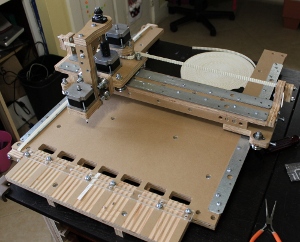
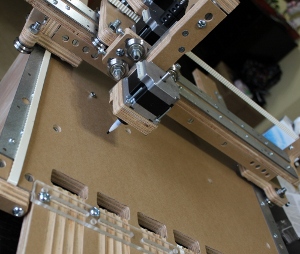
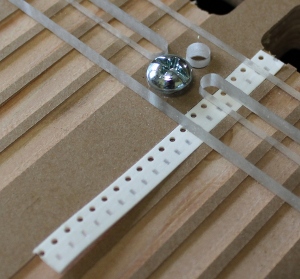
Here are some sneak peek photos of the upcoming pick and place machine called the redFrog.