BuildYourCNC
USB- und Ethernet-CNC-Steuerung für Mach3 oder Mach4 (Pokeys57CNC)
USB- und Ethernet-CNC-Steuerung für Mach3 oder Mach4 (Pokeys57CNC)
Verfügbarkeit für Abholungen konnte nicht geladen werden
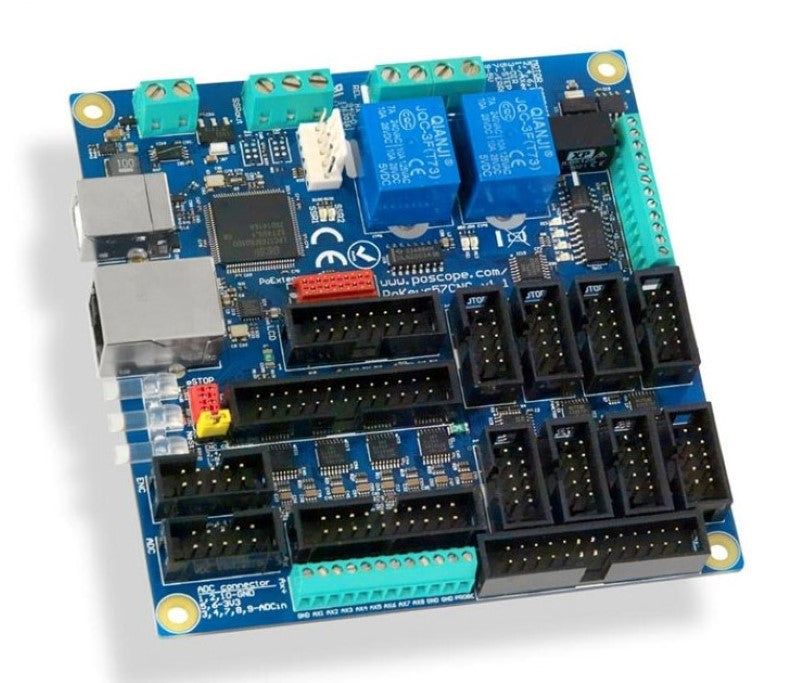
Der PoKeys57CNC Mach4 und Mach3 Motorcontroller kann bis zu 8 über STEP/DIR-Signal angesteuerte Motoren (Schrittmotoren, Servoantriebe usw.) in verschiedenen Anwendungen steuern. Das Gerät verfügt über spezielle Anschlüsse für die Verbindung mit Motorcontrollern, Pendants, (HD44780-kompatiblen) LCD-Modulen usw. Außerdem stehen 5 analoge Eingänge mit 12-Bit-Auflösung zur Verfügung. Das Gerät verfügt auch über vier galvanisch getrennte Open-Collector-Ausgänge und einen isolierten 0 bis 10 V Analogausgang.
Sie müssen das Kabelpaket für den Pokeys57CNC erwerben PoKeys57CNC Kabelpaket
Weitere Artikel zur Verwendung mit dem Pokey57CNC
PoStep60-256 Schrittmotortreiber bis zu 6 Ampere
PoStep25-32 Schrittmotortreiber bis zu 2,5 Ampere
Laden Sie das Pokeys Setup Package herunter. Dies beinhaltet die PoKeys Konfigurationssoftware, .NET-Bibliothek, PoBlocks, Mach3-Plugin usw.
Laden Sie das Mach4-Plugin und die Handbücher herunter Diese funktionsreiche CNC-Maschinen-Interface-Platine kann sowohl von Mach3 als auch von Mach4 gesteuert werden. Eines der coolsten Features ist, dass diese CNC-Bewegungssteuerplatine bis zu 8 Motoren/Achsen steuern kann. Sie können ein Pendant anschließen, um die CNC-Maschine entfernt vom Computer und Controller zu steuern, was Ihnen Zugang und Sicherheit zu den Teilen der Maschine bietet, die Sie gerade verwenden. Sehen Sie, wie der Bewegungscontroller mit dem verfügbaren LCD-Anschluss arbeitet. Verwenden Sie den verfügbaren 0-10V Analogausgang, um die Geschwindigkeit Ihrer Spindel über die Steuerungssoftware zu regeln: Mach4 oder Mach3. USB 1.1/2.0 kompatibel und Standard mit englischer USB-Tastatursimulation mit Trigger-Unterstützung für Auf- und Ab-Tasten. Auch ein Standard-USB-Joystick-Simulator (6 Achsen, 32 Tasten mit Trigger-Unterstützung). Ethernet-Verbindung 10/100 mit DHCP-Client oder fester IP-Unterstützung, auch eine TCP- oder UDP-Verbindung mit dem Gerät. 28 digitale Eingänge oder Ausgänge mit Pull-up-Widerständen, verfügbar als virtuelle USB-Tastaturtasten. Es gibt zusätzliche 4 dedizierte digitale Ausgänge. 5 analoge Eingänge (12-Bit). Mehrere Encoder-Paar-Eingänge mit drei zusätzlichen dedizierten Hochgeschwindigkeits-Encoder-Eingängen und einem Ultra-Hochgeschwindigkeits-Encoder-Eingang. Ein Hochleistungs-8-Achsen-125-kHz-Puls-Engine mit dedizierten Motoranschlüssen. Beruhigende Sicherheit durch Fail-Safe-Unterstützung bei Kommunikationsunterbrechung. Unterstützt bis zu 100 Sensoren, die an den I2C-Bus, den 1-Wire-Bus oder die allgemeinen analogen Eingänge angeschlossen werden können. Mit intuitiver und benutzerfreundlicher Software und Unterstützung von Drittanbietern über eine Kommunikations-DLL-Bibliothek und ein umfassendes Protokollspezifikationsdokument, das die Portierung auf andere Systeme ermöglicht. 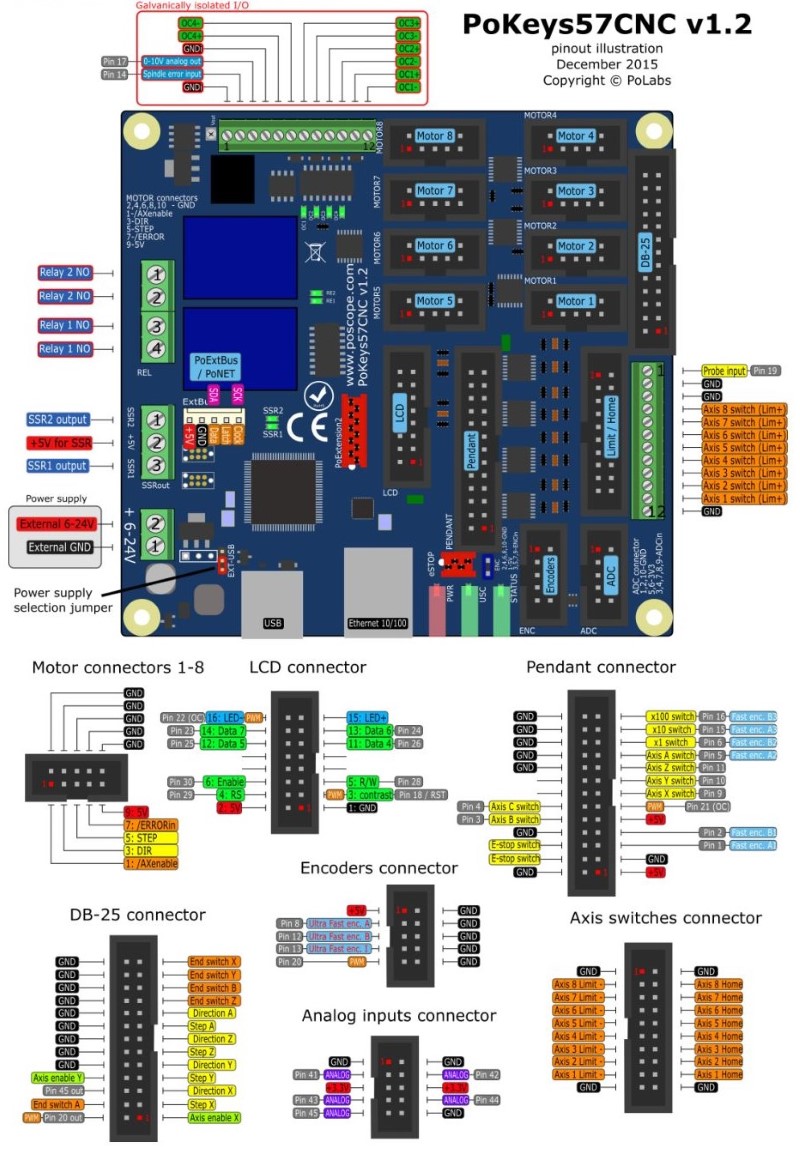 Hinweise: Mach4 Spindel VFD-Anschlüsse. OC (Open Collector Ausgänge): Vorwärts Ein/Aus-Steuerung - OC1- an DCM (oder VGND bei einigen VFDs) - OC1+ an FOR (oder FWD bei einigen VFDs) Rückwärts Ein/Aus-Steuerung - OC2- an DCM - OC2+ an REV Mach3 Spindel VFD-Anschlüsse Vorwärts Ein/Aus-Steuerung - Relais1 Anschlussklemme 1 an DCM (oder VGND bei einigen VFDs) - Relais1 Anschlussklemme 2 an FOR Rückwärts Ein/Aus-Steuerung - Relais2 Anschlussklemme 1 an DCM (oder VGND bei einigen VFDs) - Relais2 Anschlussklemme 2 an REV - Pkeys57CNC Konfiguration in Mach3: Pokeys Mapping -> Scrollen Sie zu Pulse Engine Outputs - -> Setzen Sie Relais 1 auf Ausgang #1 - -> Setzen Sie Relais 2 auf Ausgang #2 Die USB-Kommunikationsgeschwindigkeit kann durch die virtuelle Tastaturfunktion beeinträchtigt werden. Deaktivieren Sie die HID-Schnittstellen, um die Gleichmäßigkeit und Geschwindigkeit des Schrittmotorbetriebs zu verbessern.
Unübertroffener Support-Umfang:
Dieses Produkt wird von unserem Partnerunternehmen CNC49PC direkt versandt und bietet Ihnen 3 Ebenen umfassenden Supports:
- BuildYourCNC Support – Ihr primärer Ansprechpartner für alle Anfragen
- CNC49PC Partner Support – Zusätzliches technisches Fachwissen und Ressourcen
- Hersteller Support – Direkter Zugang zur Wissensdatenbank des Originalherstellers
Durch den Kauf über BuildYourCNC erhalten Sie einen überlegenen Support-Umfang, der über das hinausgeht, was bei anderen Händlern verfügbar ist – so stellen Sie Ihren Erfolg mit professioneller technischer Unterstützung auf jeder Ebene sicher.
Instructions