Skip to product information
1 of 9

BuildYourCNC

Vacuum Regulator Pump Controller

Vacuum Regulator Pump Controller

Regular price $179.00 USD
Regular price Sale price $179.00 USD
Sale Sold out
Title

This vacuum regulator (manostat) automatically turns on a vacuum pump when the vacuum level in a chamber or tank becomes too low, then shuts it off when the desired level is reached. It maintains a specific vacuum range without the need for manual control — ideal for precise and repeatable operation in vacuum forming machines, pick-and-place systems, thermoforming and blister packaging equipment, CNC dust-collection valves, vacuum work-holding tables, laboratory vacuum chambers, and vacuum storage tanks.

Originally designed for pick-and-place machines, this controller ensures consistent suction strength for component pickup and placement. It now serves a wide range of industrial, manufacturing, and laboratory vacuum control needs where steady vacuum levels are essential.

If you need to hold a steady range of vacuum pressure, this vacuum regulator — also called a manostat — is the device that will do it. Simply set your desired low and high vacuum thresholds, and the controller will keep the vacuum within that range automatically. Before developing this device, I had to manually turn the vacuum pump on and off to maintain pressure; now the process is completely automated.

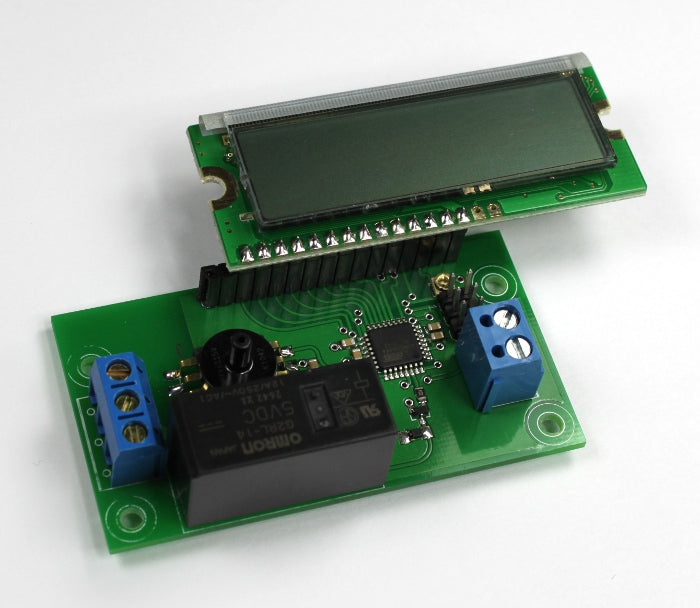
The vacuum pressure controller features two trimmer potentiometers to adjust low and high threshold points that control a vacuum pump to maintain the desired pressure range. It includes an LCD display showing the current vacuum level as well as the configured threshold settings.

The sensing range covers –115 to 0 kPa (33.96 to 0 inHg), allowing compatibility with most vacuum forming, pick-and-place, and laboratory systems. The relay output can be configured as either Normally Open (NO) or Normally Closed (NC) and supports loads up to 250 V / 12 A, suitable for directly switching standard vacuum pumps.

Operating function:

  • When the pressure drops below the low threshold, the relay engages, turning on the connected vacuum pump.
  • When the pressure rises above the high threshold, the relay disengages, turning off the pump.

Think of this vacuum regulator as a safeguard against low vacuum — reliable, precise, and versatile across automation, fabrication, and research environments.

View full details

Instructions

1
Step 1
This video demonstrates an improvement made to the vacuum pump controller. The values for the thresholds and the actual sensor inches of Hg is now in decimal form with a precision of 2 decimal places.
2
Step 2
This video describes the features of the vacuum pressure controller. All of the features are explained and demonstrated.
3
Step 3
The vacuum pressure controller requires 5 volts of power. This power can come from the computer via a USB cable, or a 5 volt power adapter. The controller requires very little current to drive the relay on this board (Relay coil: 80 mA with a coil resistance of 62.5 ohms). If a computer USB cable is used, cut the cable and expose the red and black wires from the cable. The other wires and shielding can be removed, or cut short as they are not used. For both a USB cable, or adapter, the +5V wire (red wire in the USB cable) is fastened inside of the terminal closest to the LCD. The GND (black wire in the USB cable) is fasten to the terminal farthest from the LCD.
4
Step 4
Adjust the low end threshold using a small screw driver at the left potentiometer trimmer. This will adjust the number labeled L: and is shown in inches of mercury (Hg). When the actual pressure is less than or equal to the low end threshold the relay will engage (send current to the coil of the relay and close the two terminals for NO-normally open operation.
5
Step 5
Adjust the high end threshold using a small screwdriver at the left potentiometer trimmer. The high end threshold is labeled as H: and is shown as inches of mercury (Hg). When the actual pressure in the pressure sensor is greater than or equal to the high end threshold, the relay will disengage, or opening the terminals for NO (normally open) operation).
6
Step 6
Use a tube that will fit over the pressure nozzle that has a diameter of 0.1165 inches (2.95mm). A silicone tube with a 1/16 inch inside diameter works well which stretches around the nozzle of the pressure sensor.
7
Step 7
Insert the tube over the vacuum pressure sensor nozzle. This tube will connect to the device that holds the vacuum or the line that is connected between the vacuum pump and the tank. Make sure to use a check valve between the vacuum pump and the tank (or container/device that will hold the vacuum). A check valve is a device that only allows air to travel one way. This will prevent the vacuum from escaping the tank back into the vacuum pump. The pressure sensor hole should be fitted onto the tube after this check valve, or fitted directly onto the tank.
8
Step 8
Use either an extension cord, or the power cable from the vacuum pump and remove the outside insulation. It is best to use an extension cord so that the main power cable for the vacuum pump is not damaged.
9
Step 9
Cut the black (live) wire in the AC cable and expose the strands. The live/black wire is used as this is the safest wire to pass through the relay.
10
Step 10
Insert one side of the black wire into the lower terminal. This terminal is the main terminal of the relay that will provide one side of the relay switch. Insert the other side of the black wire into the top position of the terminal. This position is the NO (normally open) position of the relay and will be open when the relay is disengaged (i.e. the two black wires will not be connected - open). When the relay is engaged, these positions will close (be connected). The middle terminal is a NC (normally closed) position with respect to the bottom terminal. Use this terminal if you want to reverse the on/off function of your vacuum pump.

Questions & Answers

Have a Question?

Ask a Question
  • What are the overall dimensions of the USB interface board? Is there a CAD model available?

    The dimensions for our USB breakout board are: L: 2.745"/ 69.723mm W: 2.244"/ 56.9976mm H: .501"/ 12.7254mm Currently we do not have a CAD model on hand.

  • Can I get the circuit diagram of the pressure controller?

    Here is a list of videos on my designing the vacuum controller/sensor circuit: https://www.youtube.com/watch?v=bm888ntJiVs https://www.youtube.com/watch?v=hYZ2Sw4SeTA https://www.youtube.com/watch?v=8wCrMzrPoeo https://www.youtube.com/watch?v=-M7tiNmgTrM https://www.youtube.com/watch?v=o3eo23OmjtQ https://www.youtube.com/watch?v=PJO_XoLL6lQ

  • I accidentally put 12vdc to the controller and now the display does not work. Can this be repaired?

    The 12VDC applied to the input voltage terminals most likely damaged the microcontroller, the LCD, and the vacuum sensor. It can be repaired, but the repair will cost more than a new vacuum pressure controller.

  • I need a similar device with slightly different operating parameters/features: push button to activate pump initially, high set point turns off pump and starts a 30 sec timer, if low set point triggers during window activate Red LED else activate Green LED. Can you assist with this?

    I would not have a problem with modifying the design; however, the change you are requesting would require a large batch purchase since the PCB design would require modifications and a new batch of PCBs would need to be purchased.

  • What sensor is used and what is the resolution of the sensor?

    The pressure sensor used in this controller does not have a specific resolution since it is analog; however, the microcontroller used in this controller receives the information from the sensor using an ADC (Analog to Digital) converter. The resolution through this process is 10-bits. A 10-bit number is from 0-1023 (1024 possible values). The accuracy of the sensor is 1.5%.