BuildYourCNC
Ethernet Smooth Stepper ESS + C25XP CNC Control Bundle
Ethernet Smooth Stepper ESS + C25XP CNC Control Bundle
Couldn't load pickup availability
Ethernet Smooth Stepper ESS + C25XP CNC Control Bundle
Build a cleaner, more professional Mach3 or Mach4 CNC control system with the Ethernet Smooth Stepper ESS motion controller and the C25XP multifunction breakout board. The ESS handles Ethernet-based CNC motion control, while the C25XP gives you the screw terminals, safety monitoring, spindle control, relays, status LEDs, and wiring interface needed for a real CNC control cabinet.
Why buy the ESS and C25XP together?
The Ethernet Smooth Stepper is the motion-control brain. The C25XP is the professional breakout board that makes the ESS easier to wire into a CNC machine. Buying them together gives you a cleaner path to a complete Mach3 or Mach4 control setup instead of buying the motion controller first and figuring out the interface board later.
ESS: Ethernet motion control
The Ethernet Smooth Stepper connects to your computer through Ethernet and works with Mach3 or Mach4 to generate motion-control signals for your CNC machine. It supports up to 6 axes, high-speed pulse output, and parallel-port-style connectivity for breakout boards.
C25XP: professional wiring interface
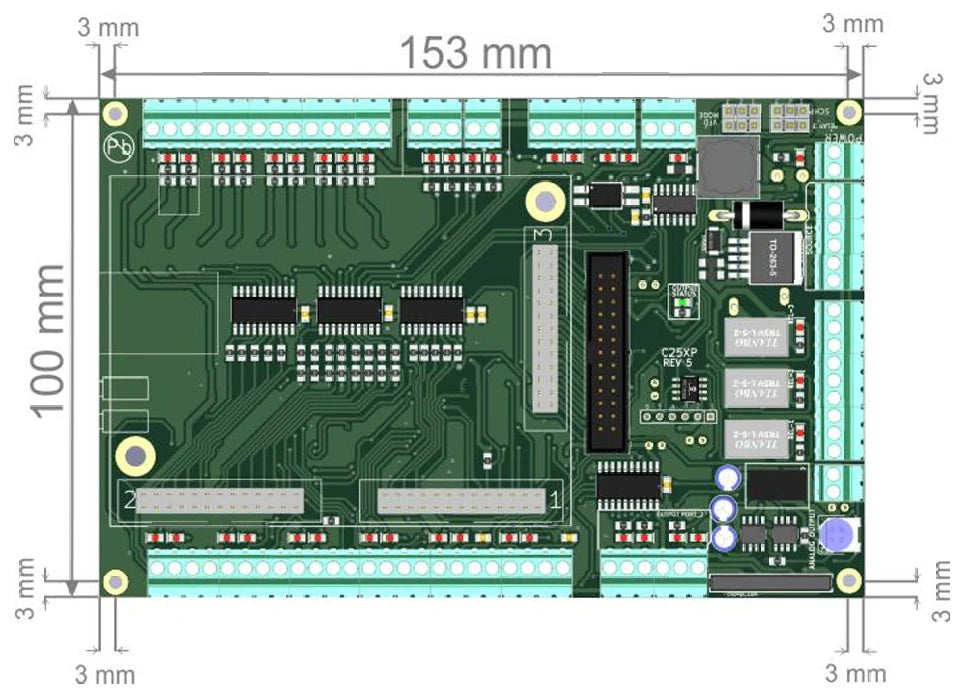
The C25XP converts the ESS IDC header connections into easy-to-use screw terminals and adds integrated safety monitoring, spindle control, relay outputs, optoisolated inputs, status LEDs, and 24V control-panel wiring.
What the Ethernet Smooth Stepper does
- Provides Ethernet-based CNC motion control
- Works with Mach3 and Mach4 CNC software
- Supports up to 6 axes of motion
- Generates step-and-direction motion signals for compatible drives
- Provides three parallel-port-style 26-pin headers
- Helps replace older parallel-port-based CNC control setups
What the C25XP adds
- Screw-terminal wiring for the ESS connections
- 51 total I/O points across three ports
- Optoisolated inputs for 5–24VDC signals
- Integrated E-stop and safety charge pump monitoring
- PWM-based spindle speed control
- Two built-in electromechanical relays with NO/NC contacts
- Status LEDs for inputs, outputs, and system function
- Single 24VDC control power input
Better than buying the ESS alone
The ESS is a powerful motion controller, but it is not a complete screw-terminal CNC control board by itself. This bundle gives you the ESS plus the C25XP interface board, making it much easier to connect stepper drivers, limit switches, home switches, E-stop, probe, VFD/spindle control, relays, coolant, and other CNC accessories.
Recommended add-on: DIN Rail Support for the ESS
If you are mounting this ESS + C25XP setup inside a CNC control cabinet, add the DIN Rail Support for the Ethernet Smooth Stepper ESS. It helps mount the ESS cleanly on DIN rail, keeping your control box more organized, secure, and easier to service.
The DIN rail support is a mechanical mounting accessory. It does not add electrical features, inputs, outputs, relays, or spindle control. Its job is simple: help mount the ESS neatly inside your enclosure.
View DIN Rail SupportBest for these CNC builds
Mach3/Mach4 retrofits
Upgrade an older control setup to Ethernet motion control while keeping breakout-board style wiring.
New CNC control boxes
A strong starting point for building a clean CNC control cabinet with organized wiring and clear diagnostics.
Spindle/VFD systems
Use the C25XP’s PWM-based spindle control and relay features for compatible spindle and accessory control setups.
What is included?
| Item | Purpose | Standalone Product |
|---|---|---|
| Ethernet Smooth Stepper ESS | Ethernet motion controller for Mach3 and Mach4 CNC systems | View ESS product page |
| C25XP Multifunction CNC Board | Professional breakout board and wiring interface for the ESS | View C25XP product page |
Optional add-on: The DIN Rail Support for Ethernet Smooth Stepper ESS is sold separately and is recommended if you want to mount the ESS neatly inside a DIN rail-based CNC control cabinet.
Common connections
- Stepper motor drivers
- Compatible digital servo drives
- Limit switches
- Home switches
- E-stop circuit
- Touch probe
- VFD/spindle control
- Coolant pump or relay-controlled accessories
Typical applications
- CNC routers
- CNC mills
- CNC lathes
- Plasma tables
- Laser tables
- Control cabinet upgrades
- Mach3 or Mach4 retrofit projects
Official setup instructions and user manual
For wiring diagrams, configuration details, Mach3/Mach4 setup notes, and product-specific installation guidance, review the official CNC4PC documentation linked below.
Documentation is provided by CNC4PC and may include wiring diagrams, setup examples, configuration notes, and technical details for the ESS and C25XP control system.
Important compatibility notes
- This bundle is intended for Mach3 or Mach4 CNC control systems.
- The C25XP is designed for use with the Ethernet Smooth Stepper.
- Stepper or servo motor drivers are still required to power your motors.
- A suitable power supply, wiring, switches, relays, and machine-specific accessories may still be required.
- The DIN Rail Support for Ethernet Smooth Stepper ESS is a recommended mounting accessory but is sold separately unless you add it to your order.
- This is not a fail-safe device and should not be used in life-support systems or applications where failure could cause property damage, injury, or loss of life.
A cleaner way to build an ESS-based CNC control system
Choose this bundle if you want the Ethernet Smooth Stepper’s proven motion control with the C25XP’s professional wiring, safety, spindle-control, and relay features in one matched setup. Add the DIN rail support if you want a cleaner ESS installation inside a CNC control cabinet.
Share